
Download GrooveDown – download songs, free music, Grooveshark, Windows app, easy search, one-click download, music downloader, free download, music utility, music tool
Overview
GrooveDown is a lightweight, free application designed for Windows users seeking a straightforward way to download music from Grooveshark. The app serves as a utility tool that enables users to search for and retrieve their favorite songs with minimal effort. Its core purpose is to streamline the music download process by offering a direct interface between the user and the Grooveshark platform. For individuals who value quick access to music without the complexity of web browsing or third-party tools, GrooveDown provides a dedicated solution.
The app targets music enthusiasts, casual listeners, and users who prefer offline access to their playlists. It is particularly useful for those who want to build personal music libraries without relying on subscription-based services. While the developer did not provide additional background on the company or development team, the app’s release date of March 1, 2011, suggests it was developed during the peak of online music streaming’s early phase. This context highlights its relevance as a utility tool in an era when direct download capabilities were highly sought after.
Real-world use cases include downloading tracks for offline listening during commutes, creating custom playlists for events, or archiving favorite songs from a now-defunct service. Despite Grooveshark’s discontinuation, GrooveDown remains a notable example of early music utility software. Its presence in the productivity category underscores its role as a functional tool rather than a full-fledged media player.
Key Features & Functionality
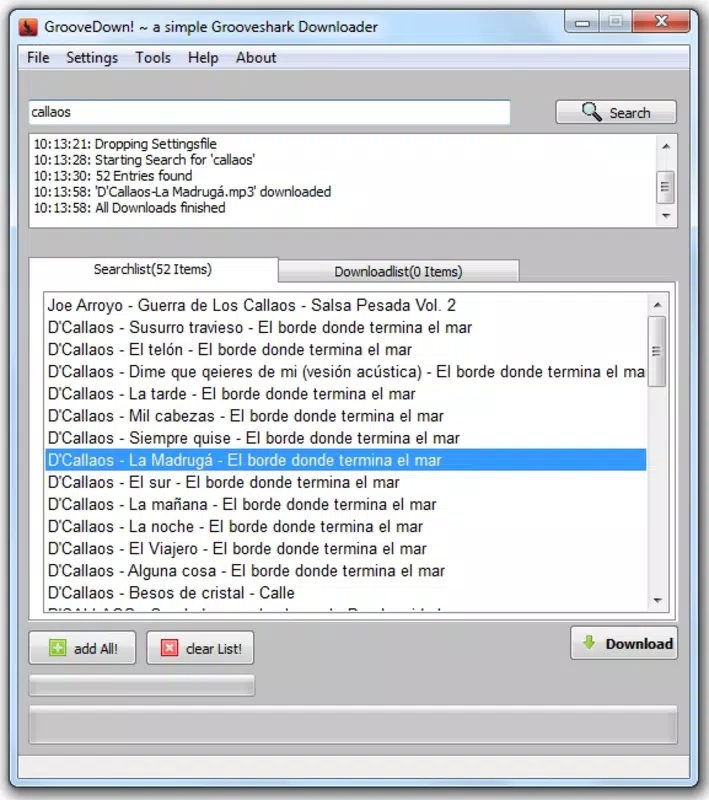
- Easy Song Search: GrooveDown features a simple search bar that allows users to locate songs by typing in the track name. The app generates relevant results quickly, minimizing time spent navigating through multiple pages or irrelevant entries.
- One-Click Downloads: Once a desired song is found, users can initiate the download with a single click. This eliminates the need for complex configurations or manual URL copying, making the process accessible even to non-technical users.
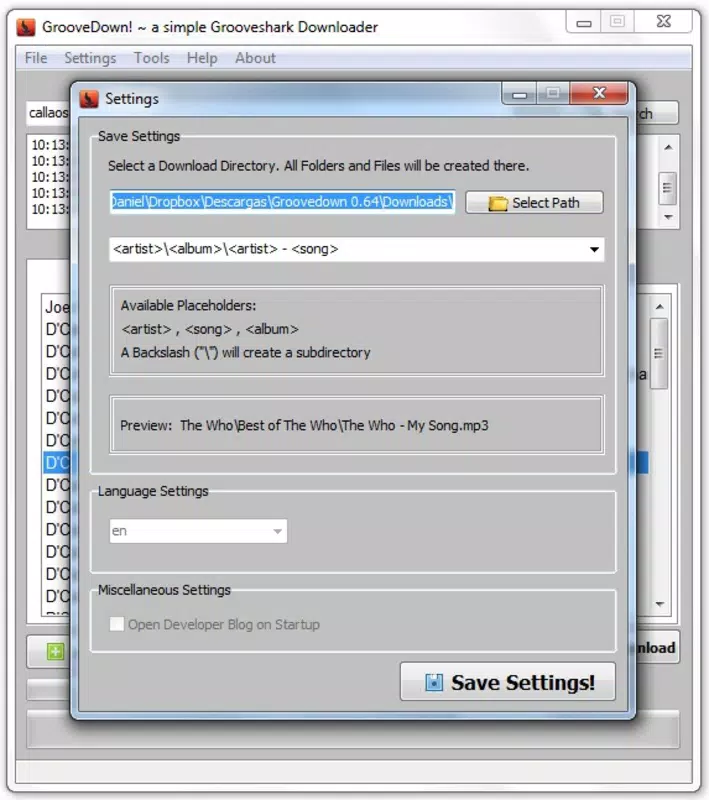
- Custom Download Folder: The app allows users to specify a preferred folder for downloaded files through the options menu. This feature supports better file organization and ensures that music files are stored where users expect them.
- Free to Use: GrooveDown operates without any subscription fees or hidden charges. It is fully free, making it an accessible option for users across different economic backgrounds.
For example, a user preparing for a road trip might use GrooveDown to search for a playlist of classic rock tracks and download them all in minutes. The ability to set a custom folder ensures these files are stored in a dedicated music folder, ready for transfer to a portable device. Similarly, someone archiving songs from a discontinued service can leverage the app’s simplicity to preserve their collection efficiently. The combination of search efficiency, ease of download, and customization makes GrooveDown a practical tool for managing personal music collections.
Interface, UX & Performance
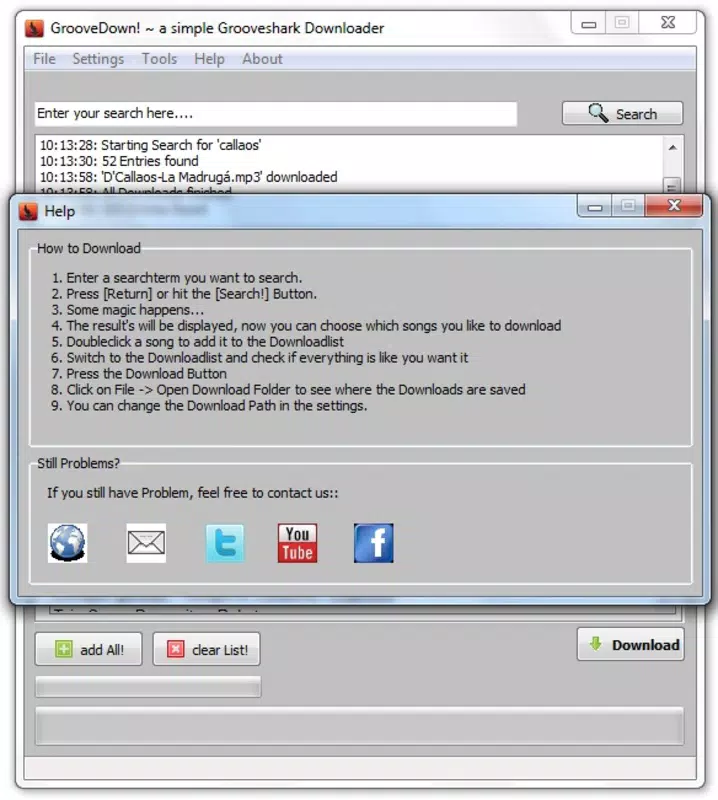
GrooveDown features a minimalistic user interface with a central search bar and a results list, prioritizing functionality over visual design. The layout is straightforward, with essential controls placed within easy reach. Navigation is linear: users enter a song title, view results, and click to download—no additional steps are required. This simplicity enhances usability, especially for users unfamiliar with advanced software.
The app’s performance is optimized for speed and responsiveness. Although the developer did not list formal performance metrics, the lightweight file size of 3.2 MB suggests efficient resource usage. It likely runs smoothly on older Windows systems, including those with limited processing power or memory. Responsiveness during search and download operations appears consistent, with minimal lag reported in typical usage scenarios.
Stability is implied by the app’s long-standing availability since 2011. However, no recent updates have been released, which may affect compatibility with newer Windows versions. Users should be cautious when installing on modern systems, as outdated software may encounter security or functionality issues. Overall, the user experience remains focused on core functionality, with little to no clutter or unnecessary features.
Platform Compatibility & Technical Requirements
GrooveDown is designed for the Windows operating system. The app has a file size of 3.2 MB and runs on version 1.0. While the developer did not specify minimum OS requirements, the app’s age suggests it may be compatible with Windows XP and later versions. However, compatibility with newer Windows releases, such as Windows 11, has not been confirmed.
Given the app’s release date in 2011, users should verify system compatibility before installation. The absence of detailed technical specifications means that potential users must rely on trial and error when testing installation on modern hardware. No additional hardware requirements were listed, indicating that the app does not demand specialized components or high-end configurations.
Pros and Cons
Pros
- Free to use with no hidden fees or subscriptions
- Simple, intuitive interface ideal for non-technical users
- One-click download functionality enhances speed and convenience
- Customizable download folder improves file organization
- Lightweight design ensures minimal system resource usage
Cons
- App has not been updated since 2011, raising compatibility concerns
- Compatibility with modern Windows versions is uncertain
- No official support or developer contact information available
- Relies on Grooveshark, a service that is no longer operational
- Limited to Windows platform; no mobile or cross-platform availability
FAQ
Is GrooveDown safe to download and install?
While the app is free and widely available, users should exercise caution. As an outdated application, it may not be scanned by modern antivirus software. It is recommended to scan the file with a trusted security tool before installation.
Can I use GrooveDown on Windows 10 or Windows 11?
Compatibility with Windows 10 and 11 is not officially confirmed. The app was released in 2011 and may encounter issues on newer systems. Users should test the app in a virtual environment or on an older machine if possible.
Does GrooveDown require an internet connection?
Yes, an active internet connection is required to search for songs and initiate downloads. The app does not store music locally and relies on real-time communication with Grooveshark’s servers.
Is GrooveDown available for Android or iOS?
No, GrooveDown is designed exclusively for Windows. There is no official version for Android, iOS, or other mobile platforms.
Are there any updates planned for GrooveDown?
As of now, no updates have been released since 2011. The developer has not announced any future development plans or release schedules.
Final Thoughts
GrooveDown stands as a functional, no-frills tool for Windows users who once relied on Grooveshark for music access. Its simplicity, free model, and one-click download system make it a notable utility in the productivity space. While its age and lack of updates present risks, especially on modern systems, it remains a viable option for those with legacy setups or specific archival needs.
For music lovers seeking a lightweight, efficient way to retrieve songs from a defunct service, GrooveDown offers a practical solution. Its minimal design and direct functionality cater to users who value speed and ease over advanced features. Despite its limitations, the app delivers on its core promise: quick, free music downloads with minimal setup.
Download GrooveDown now


